
For Australian day traders looking to enter the global futures markets, selecting the right software is just as crucial as developing a robust trading strategy. At the International Day Trading Academy, NinjaTrader 8 has remained our primary recommended trading platform for over a decade.
However, setting up NinjaTrader from Australia often raises practical questions: Can Australian residents open an account directly? How do you fund your account from an Australian bank without getting stung by foreign exchange fees? Which CME market data feed do you actually need?
This comprehensive guide walks you through the entire process; from account registration and funding to market data connections and workspace configuration. Backed by official NinjaTrader specifications and practical tips tailored for Australian traders.
Yes. Australian residents can legally open and fund an account directly with NinjaTrader Brokerage to trade US futures markets (CME, CBOT, NYMEX, COMEX), or run the NinjaTrader Desktop software connected to third-party supported brokers (such as Interactive Brokers) and independent data feeds. Account setup is completed online, and simulated paper-trading accounts are available for free.
Why Day Traders Choose NinjaTrader
Before diving into the technical setup, it helps to understand why professional futures traders favour NinjaTrader over browser-based charting tools or retail forex platforms like MetaTrader 5:
- Engineered for Futures: Unlike platforms built primarily for CFDs, NinjaTrader is purpose-built for centralized exchange-traded futures.
- SuperDOM (Depth of Market): Provides visual order book depth, allowing you to click directly on the price ladder to execute limit, market, and stop orders in milliseconds.
- ATM (Advanced Trade Management): Automatically attaches stop-loss and profit target brackets the exact millisecond an order is filled, removing emotional hesitation.
- Multi-Timeframe & Custom Tick Charts: Allows traders to chart volume, tick count, and range bars rather than arbitrary 5-minute or 15-minute time intervals.
To explore all the platform features IDTA students utilise daily, visit our NinjaTrader platform features overview.
1. Account Options for Australian Traders
When operating from Australia, you have two primary methods to run NinjaTrader:
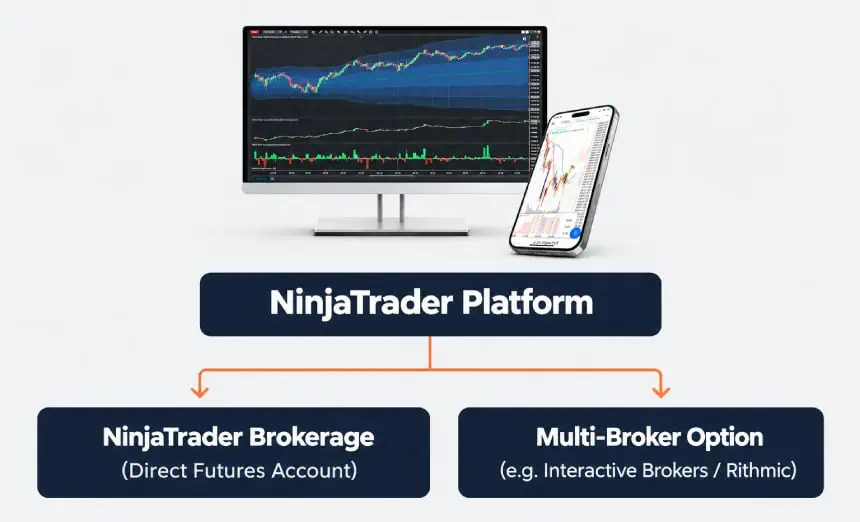
Option A: NinjaTrader Brokerage (Recommended for Futures)
Opening an account directly with NinjaTrader Brokerage is the most streamlined pathway for trading CME, E-mini, and Micro futures.
- Clearing: Accounts are cleared through major US clearing merchants (such as NinjaTrader Clearing or PhillipCapital).
- Day Trading Margins: Exceptionally low intraday margins—starting at $50 USD for Micro E-mini contracts (MES) and $500 USD for standard E-mini S&P 500 contracts (ES).
- Software Costs: The platform itself is free for live charting, market analysis, and simulated paper trading. Live order execution is available under a Free plan (standard commissions), with discounted commissions available through Monthly Lease or Lifetime License plans.
Option B: Third-Party Broker Integration
If you already hold an account with a broker like Interactive Brokers (IBKR) or use evaluation prop firms operating on Rithmic or Tradovate, you can connect the NinjaTrader Desktop client to your external account.
(Note: Using non-NinjaTrader third-party brokers on the desktop platform typically requires NinjaTrader’s Multi-Broker Add-On feature).
2. How to Fund Your NinjaTrader Account from Australia
Funding an overseas account is often where Australian beginners make costly mistakes. Because NinjaTrader accounts are denominated in USD, your deposit requires an international currency transfer.
Understanding the Fee Structure
According to official NinjaTrader account fee schedules:
- Incoming Wire Fee: $0 (NinjaTrader charges no fee to receive incoming bank wires).
- Outgoing International Wire Fee (Withdrawals): 30 units of the originating currency ($30 USD).
- Internal Currency Conversion Fee: If NinjaTrader’s treasury conducts currency conversion on your behalf, a 1% fee applies (minimum $10 fee).
Visit NinjaTrader’s website for the most up to date fee structures.
| Funding Method | Processing Speed | Cost / FX Margin | Best For |
|---|---|---|---|
| Specialized FX Transfer (Wise / Currency Broker) |
1–2 Business Days | Minimal wholesale margin (~0.4%–0.6%) | Best Value for Australians |
| Direct Bank Wire (Big 4 Australian Banks) |
2–4 Business Days | $20–$30 wire fee + 3%–4% retail FX spread | Quick setup, but higher currency cost |
Pro-Tip for Australians: Avoid Bank Retail FX Spreads
When you transfer funds directly through standard Big 4 Australian bank telegraphic transfers (TT), banks frequently charge a retail foreign exchange markup between 3% and 4.5% above the interbank rate. On a $10,000 AUD deposit, you could lose up to $400 in hidden conversion costs before placing your first trade.
Using international money transfer specialists (such as Wise or dedicated FX transfer providers) allows you to convert AUD to USD at mid-market rates, then wire USD directly to NinjaTrader’s BMO Harris / clearing account details provided in your client dashboard.
3. Selecting the Right Market Data Feed
To day trade futures, live market data is essential. Free historical or delayed data will not display current price action or the order book.
NinjaTrader connects directly to the CME Group (covering CME, CBOT, NYMEX, and COMEX). For non-professional individual traders, pricing is heavily regulated and transparent:
Level 1 (Top of Book) vs. Level 2 (Market Depth / DOM)
- Level 1 (Top of Book): Shows the current best bid, ask, and last traded price.
- Cost: $4 USD/month per individual exchange, or $12 USD/month for the full 4-exchange CME Group bundle.
- Best for: Beginners trading with standard candlestick charts without relying on the order book ladder.
- Level 2 (Full Market Depth): Shows all resting bids and offers across multiple price levels in the order book.
- Cost: $16 USD/month per individual exchange, or $48 USD/month for the complete CME Group bundle.
- Best for: Scalpers and day traders using the SuperDOM or order flow footprint charts to spot institutional liquidity.
Tip: Funded NinjaTrader Brokerage accounts frequently include complimentary Level 1 market data promotions for new live accounts. Always verify current promotional bundles inside your account portal.
For a deeper dive into the specific instruments available to trade across local and overseas exchanges, read our guide on trading futures in Australia
Step-by-Step NinjaTrader 8 Desktop Setup Guide
Follow this walkthrough to configure your platform correctly from day one:
Step 1: Download & Install ➔ Step 2: Configure Connection ➔ Step 3: Launch Sim Demo ➔ Step 4: Open Charts & DOM
Step 1: Download and Installation
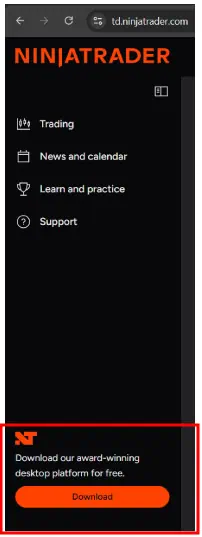
- Navigate to the official NinjaTrader website and register a profile with your email.
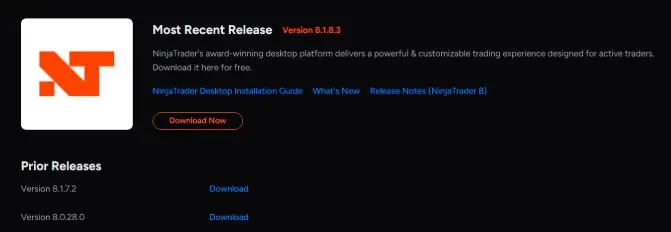
- Once logged into your dashboard, download the latest stable release of NinjaTrader 8 Desktop.
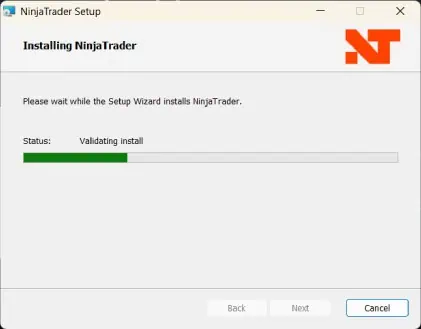
- Run the Windows installer and follow the on-screen prompts. (NinjaTrader runs natively on Windows; macOS users will require virtualization software such as Parallels).
Step 2: Log In to NinjaTrader Desktop
Once NinjaTrader 8 is installed, open the platform and log in using the username and password you created when registering on the NinjaTrader website. These are the same credentials you use to access your NinjaTrader dashboard.
- Open NinjaTrader Desktop.
- Enter your NinjaTrader username and password on the login screen, then click Log In. If you registered using Google or Apple, select the corresponding login option.
- When prompted to choose a trading mode, select Simulation to practise without risking real money.
- Click Launch to open NinjaTrader Desktop and connect to the simulation environment.
Once connected, a green indicator should appear next to the account name under Control Center > Connections.
Important: Select Simulation, not Live, while learning the platform. You do not need to configure a connection manually for the standard NinjaTrader login process.

For help, refer to NinjaTrader’s official Desktop connection guide.
Step 3: Set Up a Simulated (Demo) Account
Never trade live capital while learning software navigation. NinjaTrader provides a built-in Sim101 account.
Before placing live trades, use a simulated account to learn the platform and practise placing orders without risking real money.
NinjaTrader Desktop offers two simulation options: the local Sim101 account and the NinjaTrader Demo account linked to your NinjaTrader username.
Option A: Use the Sim101 account
Sim101 is a simulated trading account included with NinjaTrader Desktop. It lets you practise placing orders and managing trades without using real capital.
- Open NinjaTrader Desktop and log in.
- If prompted, select Simulation and click Launch.
- In the Control Centre, open the Accounts tab.
- Locate Sim101 and select it in your chart or order-entry window when placing simulated trades.
If Sim101 is not visible, you may need to enable Multi-provider mode under Tools > Settings, depending on your platform configuration.
Adjusting your simulated balance
To customise your Sim101 starting balance, right-click Sim101 in the Accounts tab and select Edit Account. Enter your preferred Initial Cash amount and click Reset to apply the change. Leave Clear History unchecked if you want to retain your existing trade history.
Option B: Use the NinjaTrader Demo account
NinjaTrader also provides a server-side Demo account linked to your NinjaTrader username. After logging in to Desktop, select Simulation and click Launch to access the simulation environment.
The Demo account is managed through the NinjaTrader online dashboard, where you can adjust its balance and other available settings. Unlike Sim101, it is also available on NinjaTrader Web and Mobile.
Important: Both accounts use simulated trading, but you still need an appropriate market data connection to practise using current market prices. Confirm that your connection is working before relying on the prices displayed in your charts.
For further instructions, refer to NinjaTrader’s official guides for the Sim101 account and Demo account settings.
Step 4: Open Your First Futures Chart
In the Control Centre, click New > Chart.
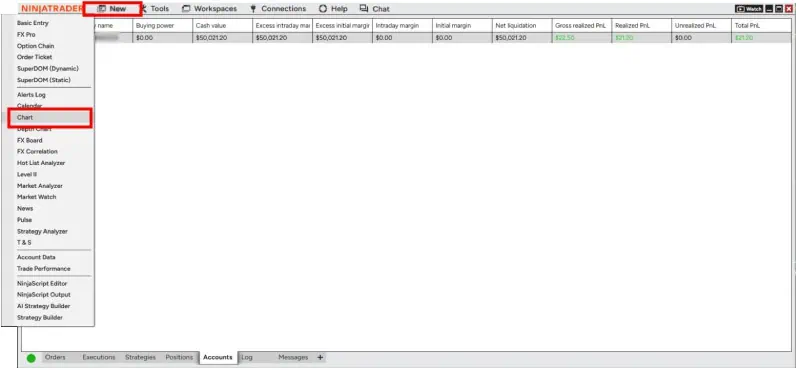
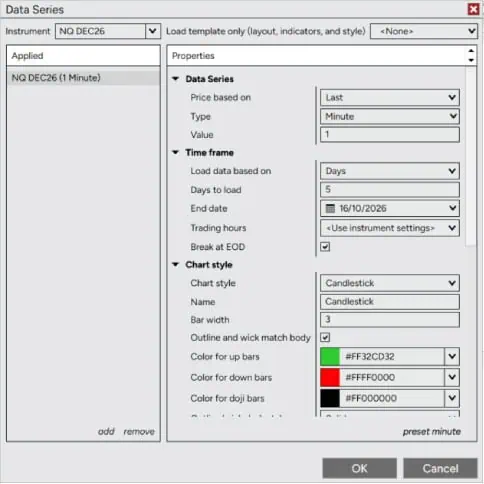
In the instrument selector, type the ticker for your market:
- MES = Micro E-mini S&P 500
- MNQ = Micro E-mini Nasdaq-100
- ES = E-mini S&P 500
Under Type, choose your preferred bar interval (e.g., 5 Minute, or 1000 Tick).
Set Days to load (e.g., 5 to 10 days for intraday analysis) and click OK.
Once your chart is active, you can apply technical analysis indicators, support and resistance lines, and track price structure using established day trading chart patterns.
6. Configuring Automated Risk Management (ATM Strategies)
One of NinjaTrader’s most powerful native features is Advanced Trade Management (ATM). An ATM strategy eliminates execution lag and prevents catastrophic losses by automatically submitting your protective stop-loss and profit target brackets the exact instant your order fills.
How to Create an ATM Strategy in NinjaTrader:
- Open a chart or the SuperDOM.
- Locate the ATM Strategy dropdown selector on the right-side control panel.
- Select <Custom>.
- In the parameters window:
- Order Quantity: Enter contract count (e.g., 1 for 1 Micro contract).
- Parameter Type: Select Ticks (1 S&P 500 tick = 0.25 points).
- Stop Loss: Enter tick distance (e.g., 12 ticks = 3 points risk).
- Profit Target: Enter tick distance (e.g., 24 ticks = 6 points reward, establishing a 1:2 risk-to-reward ratio).
- Right-click the strategy field, click Manage ATM Strategy Templates, and save it as a template (e.g., IDTA_1to2_Bracket).
With this strategy active, whenever you click to buy or sell, your stop-loss and target orders are immediately live on the exchange server. If your target is hit, NinjaTrader automatically cancels the stop-loss order (OCO — One Cancels Other).
This systematic automation protects your trading psychology and discipline, preventing revenge trading and hesitation.
7. Frequently Asked Questions (FAQ)
Is NinjaTrader available for Mac users in Australia?
NinjaTrader Desktop is a native Windows application built on the Microsoft .NET framework. However, thousands of Australian Mac users run NinjaTrader smoothly by installing Windows on their Mac via virtualization software such as Parallels Desktop or VMware Fusion. Alternatively, NinjaTrader offers a browser-based Web Platform accessible on Mac and Safari.
What are the trading hours for Australians trading US Futures?
US futures trade nearly 24 hours a day, 5 days a week (from 6:00 PM Sunday to 5:00 PM Friday US Eastern Time). For Australian East Coast traders (AEST/AEDT), this schedule is advantageous:
- US Pre-Market & Cash Open: Opens between 11:30 PM and 1:30 AM AEST (or 9:30 AM US Eastern), offering the highest volatility of the day.
- Asian Session: Futures markets remain open throughout Australian daytime hours, providing opportunities to trade overseas and Asian equity index futures during regular local business hours.
What is the minimum deposit to start trading futures on NinjaTrader?
Technically, NinjaTrader Brokerage allows accounts to be opened with as little as $50 USD to cover micro futures intraday margin. However, practically speaking, most traders begin with $500 to $1,500 AUD to ensure proper position sizing, margin buffers, and risk management parameters.
8. Summary: Next Steps for Australian Traders
Setting up NinjaTrader in Australia is straightforward once you understand how cross-border clearing, data subscriptions, and currency transfers work:
- Register a direct profile on NinjaTrader and test the desktop software in Sim101.
- Fund your account using efficient foreign exchange transfer methods to avoid major bank FX markups.
- Subscribe to non-professional CME Level 1 or Level 2 data depending on whether you trade standard charts or the SuperDOM.
- Implement automated ATM brackets to protect your capital on every execution.
If you want to master the exact strategies, chart templates, and risk rules our mentors use daily on the NinjaTrader platform, join our upcoming Free Live Workshop or explore our professionally lead Day Trading Courses to fast-track your trading education.


